Expandables with Cookies!

This tutorial will expand on the Expandable Sections instructional document to include a system where each expandable remembers its display state. This document won't cover how to build a cookie system but rather utilize an existing cookie library.

This instructive guide assumes the user has basic understanding of JavaScript, jQuery, and basic cookie manipulation.

Written by Brian Immel.

Cookie Flow Overview

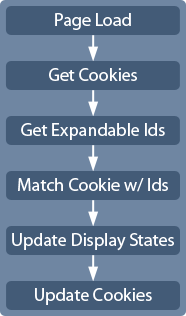
A typical page that uses cookies will do something like this: page loads, cookies are read in or initialized if they don't exist. If the page is using the cookie to manipulate the layout in some fashion, a script pulls information from the cookies and then another script does something with that information to affect the page layout. If the script allows the user to interact with the cookie-informed page elements, the cookies will be updated so the interactive display state has been "remembered".

With expandables, this process is very similar as illustrated in the right to the right.

Cookie Library

The Expandable system used in this tutorial will use cookies to store the display state of each expandable on the page. This document will walk through the steps to create individual cookies for each expandable. There are many ways to create, read, and update cookies (like having just one cookie for the entire page with a long string of values) but this tutorial will focus on cookie generation and manipulation on every instance of an expandable. With that said one could create a basic cookie system from scratch or use an existing library. That would be topic worthy of a tutorial itself. Instead, this tutorial will use a cookie library created by Maxime Haineault called JavaScript Cookie Manipulation Class.

Cookie Library
/**
* @author Maxime Haineault (max@centdessin.com)
* @version 0.3
* @desc JavaScript cookie manipulation class
*/
Cookie = {
// Get a cookie's value
get: function(key) {
tmp = document.cookie.match((new
RegExp(key +'=[a-zA-Z0-9.()=|%/]+($|;)','g')));
if(!tmp || !tmp[0]) {
return null;
} else {
return unescape(tmp[0].
substring(key.length+1,tmp[0].length).
replace(';','')) || null;
}
},
// Set a cookie
set: function(key, value, ttl, path, domain, secure) {
cookie = [key+'='+ escape(value),
'path='+ ((!path || path=='') ? '/' : path),
'domain='+ ((!domain || domain=='')?
window.location.hostname : domain)];
if (ttl) cookie.push(Cookie.hoursToExpireDate(ttl));
if (secure) cookie.push('secure');
return document.cookie = cookie.join('; ');
},
// Return GTM date string of "now" + time to live
hoursToExpireDate: function(ttl) {
if (parseInt(ttl) == 'NaN' ) return '';
else {
now = new Date();
now.setTime(now.getTime() +
(parseInt(ttl) * 60 * 60 * 1000));
return now.toGMTString();
}
}
}

This code makes short work of handling cookies for the purpose of this tutorial. Since this tutorial will only be using part of this cookie library, some of its features have been stripped out to keep the file sizes down a bit.

Save this code in a JavaScript file called cookie.js in the same directory as your JavaScript files.

Cookie Initialization

With the cookie library ready to go, the first thing that needs to happen on page load is the initialization of cookies (creating and/or reading). The cookie.js file will include some code to complete the following tasks:

  1. Get ids of every expandable and store them in an array
  2. Use the values of the array as key names for the cookies
  3. Loop through id array to read in any cookies.
    • If an cookie doesn't exist for an id, create a new cookie
    • If the cookie's key name exists, update its value
  4. Set or update cookie values based on display status of expandable.

Amend the following code below the cookie library:

$(document).ready(function() {
var cookieStatus;
var idArray = [];
...

The cookieStatus variable will temporarily hold the status value of each individual expandable before updating the cookies.

The idArray will be an array to contain all the ids of the expandables. We'll use this to loop through all the expandables and update all the display status based on the cookie's values.

Expandables Auto-hide Moves to Cookie.js

Because the order of JavaScript files has changed, the default behavior of hiding all expandable's contents needs to move as well. Insert the following code after the variables in cookie.js and remove the same line from main.js.

...
$("div[id^='expandContent']").slideUp(0);
...
Add Cookie.js to Head

With the cookie.js ready for use, it needs to be added to the head of the page.

...
<script src="../js/cookie.js"></script>
<script src="../js/main.js"></script>
...

Cookie.js must come before main.js in order for the page to have the capabilities to get and set cookies before the page's main features are called into play.

Grabbing Ids for The Cookies

With the expandables hidden by default, the next thing the script needs to do is get the ids so it can loop through and match them to a cookie. The script will use the variable idArray to store all the ids in an array.

...
$("div[id^='expandTitle']").each(function() {
idArray.push(this.id);
});

Here, the div[id^='expandTitle'] selector grabs every expandable that has an id that starts with expandTitle. This id will be used as the key for the cookie of each expandable. To push the id into the array, the each function is used to loop through selected id.

Looping Through idArray

With the idArray populated, the script should now grab the ids and sibling ids of all the expandables. The values are temporarily stored in the variables title and sibling respectively.

The title variable will be use to set the status attribute later on while the sibling is the expandable's content element and receive the change in display as needed.

for (i in idArray) {
var title = $("#" + idArray[i]).attr("id");
var sibling = $("#" + idArray[i] + " ~ div").attr("id");
...
}
No Cookie Exists

Now for the fun stuff! The script needs to check a cookie with the name of the id found in the idArray array. If the cookie doesn't exist, hide the selected expandable and set the cookieStatus variable to "hidden". This variable will be processed at the end of the loop as it applies to each id in the array.

if (Cookie.get(idArray[i]) == null) {
$("#" + sibling).slideUp(0);
cookieStatus = "hidden";
...
}
Cookie Exists and is Open

If the cookie get method matches an id and the value of the cookie is set to "open", then that expandable's content should be set to visible and the cookieStatus variable set to "open".

} else if (Cookie.get(idArray[i]) == "open") {
$("#" + sibling).slideDown(0);
cookieStatus = "open";
...
Cookie Exists and is Hidden

The final part of detecting cookies is finding a cookie that does exist but its value is set to "hidden". With this value, the sibling element should be hidden and the cookieStatus set to hidden as well.

} else if (Cookie.get(idArray[i]) == "hidden") {
$("#" + sibling).slideUp(0);
cookieStatus = "hidden";
}
Update All Cookies

With all the expandables shown or not and the cookies updated, the last step in this cookie handling script is to update the status attribute for each expandable and update the cookies.

Update the cookies

$("#" + title).attr("status",cookieStatus);
Cookie.set(idArray[i],cookieStatus);
Update If/Else block for Status

In the main.js file, the if/else status update block needs to be updated to include cookie setters. For status value of "hidden", the cookie set method should update the cookie's value in addition to the rest of the event previously defined. In this case, the cookie will receive the "open" value for the id passed to it.

...
Cookie.set(titleId,"open");

And this line of code if status is open:

...
Cookie.set(titleId,"hidden");

The whole if/else status block should look like this now:

...
if (status == "hidden") {
$("#" + siblingId).slideDown("fast");
$("#" + titleId).attr("status","open");
Cookie.set(titleId,"open");
else {
$("#" + siblingId).slideUp("fast");
$("#" + titleId).attr("status","hidden");
Cookie.set(titleId,"hidden");
}
...
Cookie Code Review

That's it! With less than 90 lines of JavaScript and jQuery, the expandables now have a memory system in place. The final code should look like this in the cookie.js file:

Cookie Handler Bits
/**
* @author Maxime Haineault (max@centdessin.com)
* @version 0.3
* @desc JavaScript cookie manipulation class
*/
Cookie = {
// Get a cookie's value
get: function(key) {
tmp = document.cookie.match((new
RegExp(key +'=[a-zA-Z0-9.()=|%/]+($|;)','g')));
if(!tmp || !tmp[0]) {
return null;
} else {
return unescape(tmp[0].
substring(key.length+1,tmp[0].length).
replace(';','')) || null;
}
},
// Set a cookie
set: function(key, value, ttl, path, domain, secure) {
cookie = [key+'='+ escape(value),
'path='+ ((!path || path=='') ? '/' : path),
'domain='+ ((!domain || domain=='')?
window.location.hostname : domain)];
if (ttl) cookie.push(Cookie.hoursToExpireDate(ttl));
if (secure) cookie.push('secure');
return document.cookie = cookie.join('; ');
},
// Return GTM date string of "now" + time to live
hoursToExpireDate: function(ttl) {
if (parseInt(ttl) == 'NaN' ) return '';
else {
now = new Date();
now.setTime(now.getTime() +
(parseInt(ttl) * 60 * 60 * 1000));
return now.toGMTString();
}
}
}
$(document).ready(function() {
var cookieStatus;
var cookieStatusArray = [];
var idArray = [];
$("div[id^='expandContent']").slideUp(0);
$("div[id^='expandTitle']").each(function() {
idArray.push(this.id);
});
for (i in idArray) {
var title = $("#" + idArray[i]).attr("id");
var sibling = $("#" + idArray[i] + " ~ div").attr("id");
if (Cookie.get(idArray[i]) == null) {
$("#" + sibling).slideUp(0);
cookieStatus = "hidden";
} else if (Cookie.get(idArray[i]) == "open") {
$("#" + sibling).slideDown(0);
cookieStatus = "open";
} else if (Cookie.get(idArray[i]) == "hidden") {
$("#" + sibling).slideUp(0);
cookieStatus = "hidden";
}
$("#" + title).attr("status",cookieStatus);
Cookie.set(idArray[i],cookieStatus);
}
});
In the main.js file, this code should have replaced the click event of any expandable's title section:

Expandable Event Handler
$(document).ready(function() {
$("div[id^='expandTitle']").click(function() {
var titleId = $(this).attr("id");
var siblingId = $("#" + titleId + " ~ div").attr("id");
var status = $(this).attr("status"); //open/hidden
if (status == "hidden") {
$("#" + siblingId).slideDown("fast");
$("#" + titleId).attr("status","open");
Cookie.set(titleId,"open");
} else {
$("#" + siblingId).slideUp("fast");
$("#" + titleId).attr("status","hidden");
Cookie.set(titleId,"hidden");
}
});
});
Summary

In review, this tutorial covered all the pieces necessary to add a memory system to toggle the display of every expandable on a page.

  1. Reviewed Maxime Haineault's Cookie Library and used select features
  2. Initialized cookies on page load
  3. Moved the auto-hide feature of all expandables into the cookie.js file
  4. Added cookie.js to the head of the HTML page
  5. Grabbed all the ids of the expandables on the page and stored them in an array
  6. Looped through the id array and set up some temporary variables to find cookie ids and sibling elements of the expandable's title section
  7. Set up display and cookie updating features for the following conditions
  8. Update all the cookies
  9. Updated the if/else block for the click event of expandable
  10. And finally, reviewed the complete code for all files

The next tutorial in this miniseries is how to add an indicator arrow that rotates when the content of an expandable is revealed. Stay tuned for that exciting tutorial.

Resources